前言
Rust作为一门新的系统语言,具有高性能、内存安全可靠、高效特性,越来越受到业界的关注及学习热潮。

learn rust from rustc(LRFRC)系列文章尝试从另外一个角度来学习Rust语言,通过了解编译器rustc基本原理来学习Rust语言,以便更好的理解和分析编译错误提示,更快的写出更好的Rust代码。
为了更好的使用rustc,下面介绍linux环境下如何编译rustc,如何查看rustc相关log及调试rustc,最后了解其编译过程。
一、编译rustc
1.准备编译环境
<下面介绍ubuntu16.04相关,rustc本身也支持win/mac>
A.安装软件工具及依赖库
$ sudo apt-get install python3 curl git libssl-dev pkg-config g++ make cmake
其中要求g++ 5.1及以上版本,make 3.81及以上版本,cmake 3.4.3版本
B.硬件及网络环境要求
剩余空间>=15G,最好25GB以上. 内存>=8GB Cpu核心>=4 联网
2.获取源代码及配置
$ git clone https://github.com/rust-lang/rust.git
$ cd rust
$ cp config.toml.example config.toml
针对x86_64编译目标,修改config.toml如下
# which are used to install Rust and Cargo together. This is disabled by
# default. The `tools` option (immediately below) specifies which tools should
# be built if `extended = true`.
-#extended = false
+extended = true
-#tools = ["cargo", "rls", "clippy", "rustfmt", "analysis", "src"]
+tools = ["cargo", "rls", "clippy", "rustfmt", "analysis", "src"]
# Instead of installing to /usr/local, install to this path instead.
#prefix = "/usr/local"
+prefix = "/home/working/rust.1.48.my"
-#debug = false
+debug = true
-#debug-assertions = false
+debug-assertions = true
# Defaults to 1 if debug is true
-#debuginfo-level = 0
+debuginfo-level = 2
3.执行编译
$ ./x.py build -j4 && ./x.py install -j4
4.查看编译结果
在网络正常情况下,大约需要2-3小时,可编译并安装完成rustc及相关工具,编译结果如下:
$ cd /home/working/rust.1.48.my/
$ ls bin
cargo*
cargo-clippy*
cargo-fmt*
cargo-miri*
clippy-driver*
rls*
rustc*
rustfmt*
rust-gdb*
rust-lldb*
rustup
$ ls lib
libchalk_derive-3cc16a51cc4dd3f2.so
libLLVM-11-rust-dev.so
librustc_driver-303d1f8ea8fd7bf9.so
librustc_macros-af73f2a3345352c5.so
libstd-8b4b72a1c691784f.so
libtracing_attributes-54c9ecfd0d617a1d.so
rustlib/
rust基础meta lib库 其中记录基础crate相关的名称meta信息,便于后续rustc编译use crate时使用.
$ ls lib/rustlib/x86_64-unknown-linux-gnu/lib/
libaddr2line-5a5a94ba26237d7a.rlib
libadler-5ca04ddd4d2c33dd.rlib
liballoc-9960ffde4123115e.rlib
libcfg_if-f6a8cd645fb07161.rlib
libcompiler_builtins-4d9685c14775ef45.rlib
libcore-697265991f2f3749.rlib
libgetopts-b94217efc6066fec.rlib
liblibc-d759cf6f2ff8c3fc.rlib
libobject-295752f3b2d0d664.rlib
libpanic_abort-ab1768e08f43c96b.rlib
libpanic_unwind-8c6e5361e877e6c5.rlib
libproc_macro-a3042c7e461a9595.rlib
librustc_demangle-e54535d8b84448ef.rlib
librustc_std_workspace_alloc-3eb132aba46f452e.rlib
librustc_std_workspace_core-ffc57ab49ae54890.rlib
librustc_std_workspace_std-881735f2c1af5414.rlib
libstd-8b4b72a1c691784f.rlib
libterm-c251e0eafc8b2866.rlib
libtest-8eb9ded0d7e61d4b.rlib
libunicode_width-cd3bd95206c2ab73.rlib
libunwind-053ceca8905924e3.rlib
5.运行验证编译结果
将prefix路径/home/working/rust.1.50.my/bin加到bash的PATH环境变量中 运行
$ export PATH = /home/working/rust.1.50.my/bin:$PATH
$ rustc -vV
rustc 1.48.0-dev
binary: rustc
commit-hash: unknown
commit-date: unknown
host: x86_64-unknown-linux-gnu
release: 1.48.0-dev
LLVM version: 11.0
6.编译支持其他目标平台wasm32
rustc代码库支持同一套代码编程生成的rustc可用来编译输出不同目标代码
$ cd rust
$ cp config.toml.example config.toml
A.针对wasm32编译目标
修改config.toml如下
+target = ["wasm32-unknown-unknown"]
# which are used to install Rust and Cargo together. This is disabled by
# default. The `tools` option (immediately below) specifies which tools should
# be built if `extended = true`.
-#extended = false
+extended = true
-#tools = ["cargo", "rls", "clippy", "rustfmt", "analysis", "src"]
+tools = ["cargo", "rls", "clippy", "rustfmt", "analysis", "src"]
# Instead of installing to /usr/local, install to this path instead.
#prefix = "/usr/local"
+prefix = "/home/working/rust.1.48.my"
-#debug = false
+debug = true
-#debug-assertions = false
+debug-assertions = true
# Defaults to 1 if debug is true
-#debuginfo-level = 0
+debuginfo-level = 2
B.执行编译
$ ./x.py build -j4 && ./x.py install -j4
C.查看编译结果
$ cd /home/working/rust.1.48.my/
# bin及lib库名称与x86_64基本没有变化,增加子目录wasm32-unknown-unknown
$ ls lib/rustlib/wasm32-unknown-unknown/lib
libstd-00097c893c2a4122.rlib
libproc_macro-1141e85c3414e735.rlib
其他rlib
7.验证使用同一rustc编译生成不同目标代码
$ vim lrfrc.rs
fn main() {
    println!("hello lrfrc!");
}
# 生成可执行程序lrfrc
$ rustc lrfrc.rs
$ ./lrfrc
hello lrfrc!
#生成lrfrc.wasm
$ rustc --target wasm32-unknown-unknown lrfrc.rs
#lrfrc.wasm可通过其他wasm-gc/wasm2wat工具生成WAT格式,或使用wasm-bindgen生成lrfrc.js在js环境使用。
8.rustc支持不同目标平台
相对gcc来讲,rustc对不同目标平台的支持比较方便,在相同Host环境下比如x86_64使用统一的rustc程序,只需加上不同–target参数就可以生成不同目标平台代码,
而对gcc来讲,在相同Host环境x86_64下,要编译输出目标为x86_64和arm的代码,需要使用不同的gcc程序比如gcc和arm_gnu_gcc,指定的gcc只能输出对应目标的代码,而rustc只需要一个这样的rustc,这样rustc更有利于对跨平台的编译器及其依赖库的维护;
二、使用rustc
1.打印rustc编译log
#输出rustc编译时的debug或info信息
$ RUSTC_LOG=debug rustc lrfrc.rs
#输出rustc指定crate对应的debug或info信息
$ RUSTC_LOG=rustc_mir_build=debug rustc lrfrc.rs
2.使用其他选项
#输出未进行宏扩展的ast树
$ rustc -Z ast-json-noexpand=yes lrfrc.rs
#输出宏扩展后的ast树
$ rustc -Z ast-json=yes lrfrc.rs
#输出hir格式的中间描述
$ rustc -Z unpretty=hir lrfrc.rs
#输出hir格式并带有类型信息的中间描述
$ rustc -Z unpretty=hir,typed lrfrc.rs
#输出hir格式并带有完整树结构的中间描述
$ rustc -Z unpretty=hir-tree lrfrc.rs
#输出mir格式的中间描述
$ rustc -Z unpretty=mir lrfrc.rs
#输出llvm ir格式的中间描述
$ rustc --emit llvm-ir lrfrc.rs
#输出汇编格式的中间描述
$ rustc --emit asm lrfrc.rs
#分析中间汇编输出
$ rustc -C opt-level=3 --emit=obj lrfrc.rs
$ size -A lrfrc.o
$ objdump -d lrfrc.o
3.其他
配置vim支持rust语言,可方便跳转提示关联阅读rustc代码; 使用gdb调试rustc; 使用https://play.rust-lang.org/在线编写、编译、分析rust代码;
三、rustc编译过程
1.编译器自举编译
根据前面LRFRC系列前言中的说明,rustc编译器本身已完成编译自举,其主要逻辑如下: 要想编译出一个新的rustc编译器,首先需要选择一个以前编译出来的rustc编译器,用这个老的rustc编译器来编译rustc代码库以生成一个新的rustc编译器;
但是由于rustc编译器与其std标准库代码往往在同一个git代码库,相互之间存在依赖,编译器与std标准库<可查看上面提到的编译结果>通常一块编译并输出,才可正常使用;
而在git代码库中有可能同时修改std标准库逻辑和编译器逻辑,这样让编译出一个完整的全新的编译器<包括对应std标准库>变得比较复杂,其编译过程被定义成不同阶段;
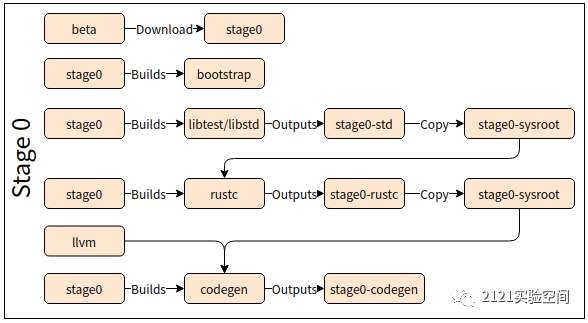
stage0:从网上下载一个老的beta编译器及其对应std库/cargo等,用beta rustc和std来编译当前代码库,输出当前代码库对应std和rustc<用新生成的std来链接>;
利用stage0输出的rustc和std来编译当前代码库,输出当前代码库对应std和rustc<用新生成的std来链接>;
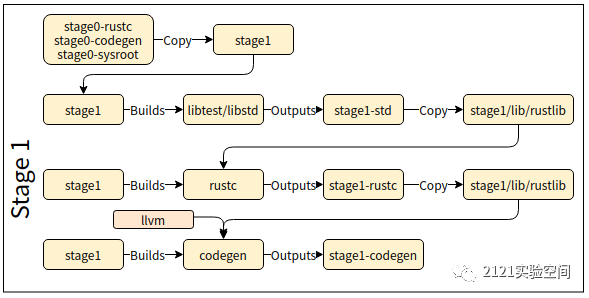
为啥还需要stage1和2呢?简单的看来,使用stage0的输出就可以,无须stage1和stage2进行再次编译输出,其实并不是这样,
这是因为stage0中输出的rustc和std可能与beta中对应的rustc和std存在符号ABI不兼容,并存在对beta std库符号的引用或依赖,
这样直接使用stage0中输出的rustc和std来编译开发人员开发的代码,就有可能还存在对beta中的rustc和std依赖,这是不符合要求的, 所以需要stage1来进行再一次编译并输出;
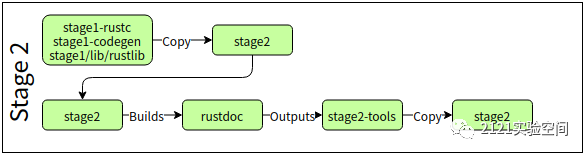
复制输出stage1输出的rustc和std,针对Host/Target不一致时需要重新生成对应std;
stage3:可选的,用于sanity检查,使用stage2输出的rustc和std来编译当前代码库,生成的rustc和std应该跟stage2输出的完全一样;
链接到rustc的std库和使用该rustc来编译开发人员开发的rust代码时所用的std库可能是不一样的;
这样stage2输出的rustc和std,可作为最终的分发版本提供给开发者使用,开发者通过rustup相关工具安装的rustc和std也是stage2输出的版本;
2.stage0自举编译
新的rustc及std代码可能新增或稳定一个feature,而老的beta编译器甚至不支持这个feature,对同一份新的rustc和std代码,为了区分是否不同stage的编译,rustc代码中引入–cfg bootstrap、cfg(not(bootstrap))或RUSTC_BOOTSTRAP=1来区分不同stage的编译过程及对应的编译器;
为了方便不同stage的编译及环境变量/配置参数的设置,rustc中内建一个bootstrap程序,它由x.py在下载成功beta rustc编译后,编译src/bootstrap/bin/main.rs生成,然后x.py将编译不同stage的过程统一交给bootstrap程序来实现,其中包括设置影响环境变量/sysroot后调用cargo来编译rustc/std,同时维护不同stage文件和编译状态推进;
3.不同stage编译流程及输出
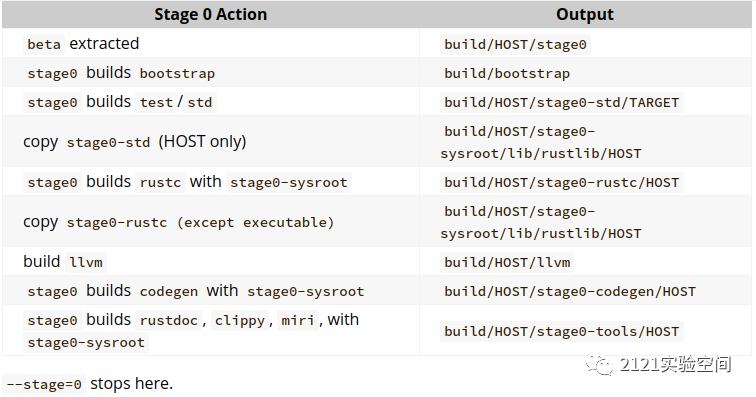
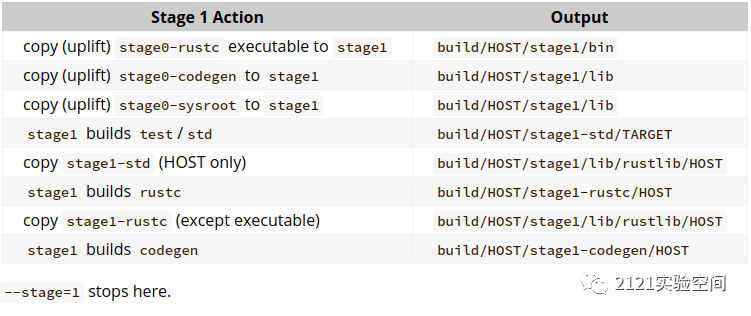
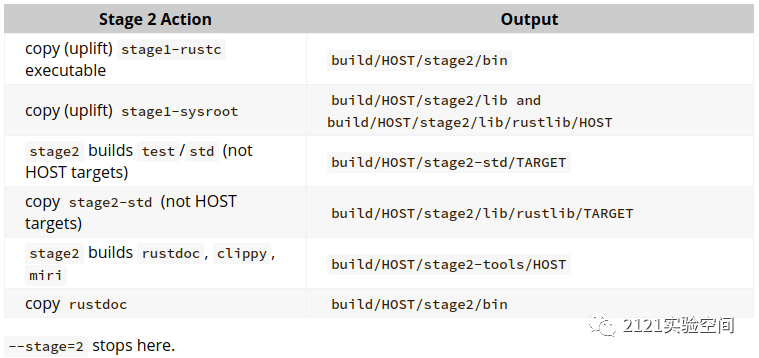
其中需要注意的是:不同stage N对应的std,由stage N使用的编译器编译出来,并会链接到由stage N对应编译器编译出来的那个编译器,并通过stageN-sysroot目录来存放stage N新生成的库和二进制;
4.sysroot路径
sysroot用来描述编译器依赖的路径, 其子目录lib中包含LLVM、librustc_driver、librustc_macros、libstd、libtest相关库,其代表编译器运行时依赖库, 其子目录lib中rustlib/x86_64-unknown-linux-gnu/、rustlib/wasm32-unknown-unknown/代表不同编译目标对应std库的运行时依赖路径, cargo会使用它来作为搜索路径;
$ rustc --print sysroot
/home/working/rust.1.48.my
参考
更多文章可使用微信扫码公众二维码查看
